Enable AWS Shield Advanced
Introduction
Services must currently enable AWS Shield Advanced manually. In the future Shield Advanced will be enabled by default for all accounts within the BSA AWS Cloud platform.
Procedure
To enable AWS Shield Advanced for your AWS account, follow these steps:
Subscribe to Shield Advanced
Please note enabling Advanced Shield does not automatically protect resources. You will need to configure protection for your resources separately after Shield Advanced has been enabled.
- Add a new file called shield-advanced.tf to your infrastructure repo and add the following terraform code:
The cost of AWS Shield Advanced is at an organisation level, meaning the fee of $3000 per month is for the whole estate (regardless of how many accounts are set up to use it). Therefore this price is not charged at a service level and already covered.
Assigning Protected Resources
- Now we use Terraform to attach the above shield subscription to our intended resources. The following code is example for adding a load balancer:
# Shield configuration for ALB
resource "aws_shield_protection" "alb" {
  count        = var.environment[terraform.workspace] == "prod" ? 1 : 0
  name         = "hs-shield-protection-alb"
  resource_arn = module.alb.lb_arn
}

resource "aws_shield_application_layer_automatic_response" "alb" {
  count        = var.environment[terraform.workspace] == "prod" ? 1 : 0
  resource_arn = module.alb.lb_arn
  action       = "BLOCK"
}
- Start by configuring AWS WAF rules in COUNT mode to monitor traffic patterns without impacting users. Review any requests flagged as potential threats via the AWS Console.

- When satisfied, switch the rules to BLOCK mode to activate full application layer DDoS protection with Shield Advanced. This again is done by updating our shield.tf file and switching from COUNT to BLOCK.
Integration with WAF
-
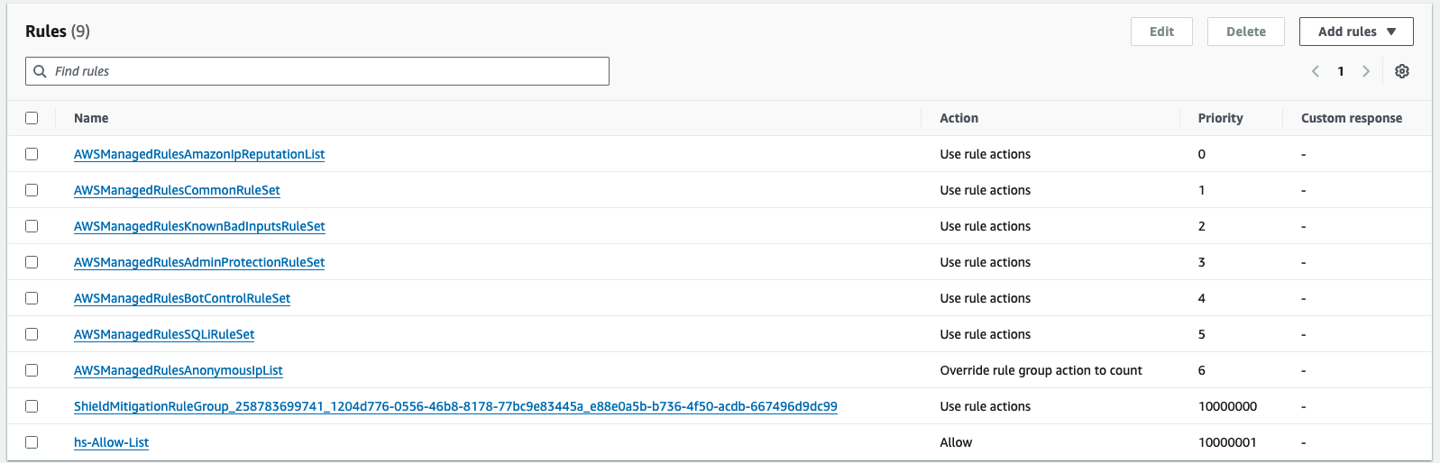
When AWS Shield Advanced is enabled and assigned to a resource it adds it’s own set of rules fully managed by AWS to our AWS WAF ACL. It will assign this rule a high priority to ensure that it is hit after any existing rules.
-
If your WAF rules contain an allow list which will restrict traffic to allow only a certain number of IPs for an internal service or all IPs for a public service it needs to come last in the list.
-
With this set up you need to amend your new shield mitigation rule to come before the allow list rule so that it is in use and taken into account before the allow list rule.
-
For example the Shield Mitigation Rule is set to 10000000 when added meaning any allow rule present should be set to at least 10000001. This can be seen below:
Add Proactive Engagement Contact Details and Role
- In order to configure access to Shield Advanced for AWS technical team and give them contacts details at the NHS BSA, add the following terraform code:
resource "aws_shield_proactive_engagement" "enabled" {
  enabled = true
  emergency_contact {
    contact_notes = "In Hours (GMT/BST 09:00-17:00 Monday - Friday)"
    email_address = "itservicemanagement@nhsbsa.nhs.uk"
    phone_number  = "+443003303330"
  }
  emergency_contact {
    contact_notes = "Out of Hours - Call only"
    email_address = "itservicemanagement@nhsbsa.nhs.uk"
    phone_number  = "+447901115394"
  }
  depends_on = [aws_shield_drt_access_role_arn_association.aws_srt]
}

resource "aws_iam_role" "aws_srt" {
  name = "NHSBSA_aws_shield_response_team"
  description = "Role for DDoS response team to review AWS resources in your account and to mitigate DDoS attacks against your infrastructure by creating WAF rules and AWS Shield protections."
  assume_role_policy = jsonencode({
    Version = "2012-10-17"
    Statement = [
      {
        "Sid" : "",
        "Effect" : "Allow",
        "Principal" : {
          "Service" : "drt.shield.amazonaws.com"
        },
        "Action" : "sts:AssumeRole"
      },
    ]
  })
}
resource "aws_iam_role_policy_attachment" "aws_srt" {
  role       = aws_iam_role.aws_srt.name
  policy_arn = "arn:aws:iam::aws:policy/service-role/AWSShieldDRTAccessPolicy"
}
resource "aws_shield_drt_access_role_arn_association" "aws_srt" {
  role_arn = aws_iam_role.aws_srt.arn
}