Datadog Setup
Datadog is the monitoring and alerting platform used across NHS BSA services. It collects AWS service metrics, plus application metrics and logs from NHS BSA workloads running on AWS.
Your project services should be integrated with the NHSBSA_BSACloud_V2 Datadog organisation.
Access
Raise a service desk request using an ITSM Halo ticket. The appropriate role is assigned based on your requirements. You receive an invitation link, and on first visit you need to set a password.
- Login page: https://app.datadoghq.com/account/login (US1-East)
- Sign in with your username and password — not Single Sign-On.
NHS BSA Naming Conventions and Useful Variables
To align with NHS BSA resource naming conventions, define an additional local variable:
Apply this convention consistently across all resources.
Define the following reusable variables to avoid duplication:
variable "service" {
  type    = string
  default = "mccloud" # <-- Might be different
}

variable "department" {
  type    = string
  default = "nhs-workforce-services" # <-- Might be different
}

variable "service_line" {
  type    = string
  default = "pensions-services" # <-- Might be different
}

variable "env_name" {
  type = map(string)
  default = {
    dev   = "dev"
    test  = "tst"
    stage = "stg"
    prod  = "pro"
  }
}

# Datadog variables
variable "datadog_settings" {
  type = map(string)
  default = {
    account_id = "464622532012" # Shared Datadog AWS account ID
  }
}
AWS Account Integration
Configure this integration through Terraform to collect CloudWatch metrics and events from AWS services. It operates at the account level, not the service level. If multiple services run in one account, configure the integration once.
API Key
After signing in, you can find API keys for each AWS account at: https://app.datadoghq.com/organization-settings/api-keys
Store the API key in AWS Secrets Manager. After applying the Terraform below, update the secret value manually in the AWS Console.
resource "aws_secretsmanager_secret" "datadog" {
  name        = format(local.name_prefix, "sm", "datadog-configuration", "01")
  description = "Datadog configuration"
}

resource "aws_secretsmanager_secret_version" "datadog" {
  secret_id     = aws_secretsmanager_secret.datadog.id
  secret_string = "placeholder" // gitleaks:allow
  lifecycle {
    ignore_changes = [
      secret_string
    ]
  }
}
Terraform Provider
To use Datadog resources, define the Datadog provider:
terraform {
  required_version = ">= 0.15.0"
  required_providers {
    datadog = {
      source  = "DataDog/datadog"
      version = "~> 3.78.0"
    }
  }
}

provider "datadog" {
  api_key = data.aws_secretsmanager_secret_version.datadog_configuration.secret_string
}
If you have configured the aws_secretsmanager_secret resource above, you can reference it in the provider configuration.
Note:
app_keyis configured globally at the GitLab level for all projects as theDD_APP_KEYenvironment variable. Terraform picks it up automatically.
Integration Resources
See Datadog AWS Integration for implementation details.
resource "datadog_integration_aws_external_id" "dd_external_id" {}

resource "datadog_integration_aws_account" "aws_integration" {
  account_tags = [
    "service:${var.service}",
    "env:${var.env_name[terraform.workspace]}",
    "department:${var.department}",
    "service_line:${var.service_line}",
    "business_service:${var.service}",
  ]
  aws_account_id = data.aws_caller_identity.current.account_id
  aws_partition  = "aws"

  aws_regions {
    include_only = [data.aws_region.current.name]
  }

  auth_config {
    aws_auth_config_role {
      role_name   = module.datadog_role.iam_role_name
      external_id = datadog_integration_aws_external_id.dd_external_id.id
    }
  }

  logs_config {
    lambda_forwarder {}
  }

  resources_config {
    cloud_security_posture_management_collection = true
    extended_collection                          = true
  }

  metrics_config {
    automute_enabled          = true
    collect_cloudwatch_alarms = true
    collect_custom_metrics    = true
    enabled                   = true
    namespace_filters {
      exclude_only = []
    }
  }

  traces_config {
    xray_services {
      include_only = []
    }
  }
}
IAM Role and Policy
The full list of required IAM permissions is documented in Datadog AWS IAM permissions reference.
module "datadog_iam_policy" {
  source  = "terraform-aws-modules/iam/aws//modules/iam-policy"
  version = "= 5.55.0"

  name        = format(local.name_prefix, "datadog", "AWS-Integration-policy", "01")
  path        = "/"
  description = "Policy for Datadog AWS Integration"

  policy = data.aws_iam_policy_document.datadog_iam_policy.json
}

data "aws_iam_policy_document" "datadog_iam_policy" {
  statement {
    sid    = "DatadogIAMPolicy"
    effect = "Allow"
    actions = [
      "account:GetAccountInformation",
      "airflow:GetEnvironment",
      "airflow:ListEnvironments",
      "apigateway:GET",
      "autoscaling:Describe*",
      "backup:List*",
      "bcm-data-exports:GetExport",
      "bcm-data-exports:ListExports",
      "budgets:ViewBudget",
      "cloudfront:GetDistributionConfig",
      "cloudfront:ListDistributions",
      "cloudtrail:DescribeTrails",
      "cloudtrail:GetTrail",
      "cloudtrail:GetTrailStatus",
      "cloudtrail:ListTrails",
      "cloudtrail:LookupEvents",
      "cloudwatch:Describe*",
      "cloudwatch:Get*",
      "cloudwatch:List*",
      "codedeploy:BatchGet*",
      "codedeploy:List*",
      "cur:DescribeReportDefinitions",
      "directconnect:Describe*",
      "dynamodb:Describe*",
      "dynamodb:List*",
      "ec2:Describe*",
      "ecs:Describe*",
      "ecs:List*",
      "eks:DescribeCluster",
      "eks:ListClusters",
      "elasticache:Describe*",
      "elasticache:List*",
      "elasticfilesystem:DescribeAccessPoints",
      "elasticfilesystem:DescribeFileSystems",
      "elasticfilesystem:DescribeTags",
      "elasticloadbalancing:Describe*",
      "elasticmapreduce:Describe*",
      "elasticmapreduce:List*",
      "es:DescribeElasticsearchDomains",
      "es:ListDomainNames",
      "es:ListTags",
      "events:CreateEventBus",
      "fsx:DescribeFileSystems",
      "fsx:ListTagsForResource",
      "health:DescribeAffectedEntities",
      "health:DescribeEventDetails",
      "health:DescribeEvents",
      "iam:ListAccountAliases",
      "kinesis:Describe*",
      "kinesis:List*",
      "lambda:List*",
      "logs:DeleteSubscriptionFilter",
      "logs:DescribeDeliveries",
      "logs:DescribeDeliverySources",
      "logs:DescribeLogGroups",
      "logs:DescribeLogStreams",
      "logs:DescribeSubscriptionFilters",
      "logs:FilterLogEvents",
      "logs:GetDeliveryDestination",
      "logs:PutSubscriptionFilter",
      "logs:TestMetricFilter",
      "network-firewall:DescribeLoggingConfiguration",
      "network-firewall:ListFirewalls",
      "oam:ListAttachedLinks",
      "oam:ListSinks",
      "organizations:Describe*",
      "organizations:List*",
      "rds:Describe*",
      "rds:List*",
      "redshift-serverless:ListNamespaces",
      "redshift:DescribeClusters",
      "redshift:DescribeLoggingStatus",
      "route53:List*",
      "s3:GetBucketLocation",
      "s3:GetBucketLogging",
      "s3:GetBucketNotification",
      "s3:GetBucketTagging",
      "s3:ListAllMyBuckets",
      "s3:PutBucketNotification",
      "ses:Get*",
      "ses:List*",
      "sns:GetSubscriptionAttributes",
      "sns:List*",
      "sns:Publish",
      "sqs:ListQueues",
      "ssm:GetServiceSetting",
      "ssm:ListCommands",
      "states:DescribeStateMachine",
      "states:ListStateMachines",
      "support:DescribeTrustedAdvisor*",
      "support:RefreshTrustedAdvisorCheck",
      "tag:GetResources",
      "tag:GetTagKeys",
      "tag:GetTagValues",
      "timestream:DescribeEndpoints",
      "wafv2:ListLoggingConfigurations",
      "xray:BatchGetTraces",
      "xray:GetTraceSummaries"
    ]
    resources = [
      "*"
    ]
  }
}

module "datadog_role" {
  source  = "terraform-aws-modules/iam/aws//modules/iam-assumable-role"
  version = "= 5.55.0"

  create_role         = true
  role_name           = format(local.name_prefix, "datadog", "AWS-Integration-role", "01")
  role_description    = "Role assumed by the external Datadog AWS account for the integration"
  role_requires_mfa   = false
  role_sts_externalid = [datadog_integration_aws_external_id.dd_external_id.id]

  trusted_role_arns = [
    "arn:aws:iam::${var.datadog_settings["account_id"]}:root"
  ]

  custom_role_policy_arns = [
    module.datadog_iam_policy.arn,
  ]
}
NHS BSA Service Integration
The two main AWS service types used across NHS BSA are ECS Fargate and AWS Lambda.
ECS Fargate
ECS tasks are configured with two sidecar containers to ship logs, metrics, and traces to Datadog:
- AWS FireLens (built on Datadog's Fluent Bit output plugin) — ships logs directly to Datadog.
- Datadog Agent — collects metrics from containers via the ECS task metadata endpoint.
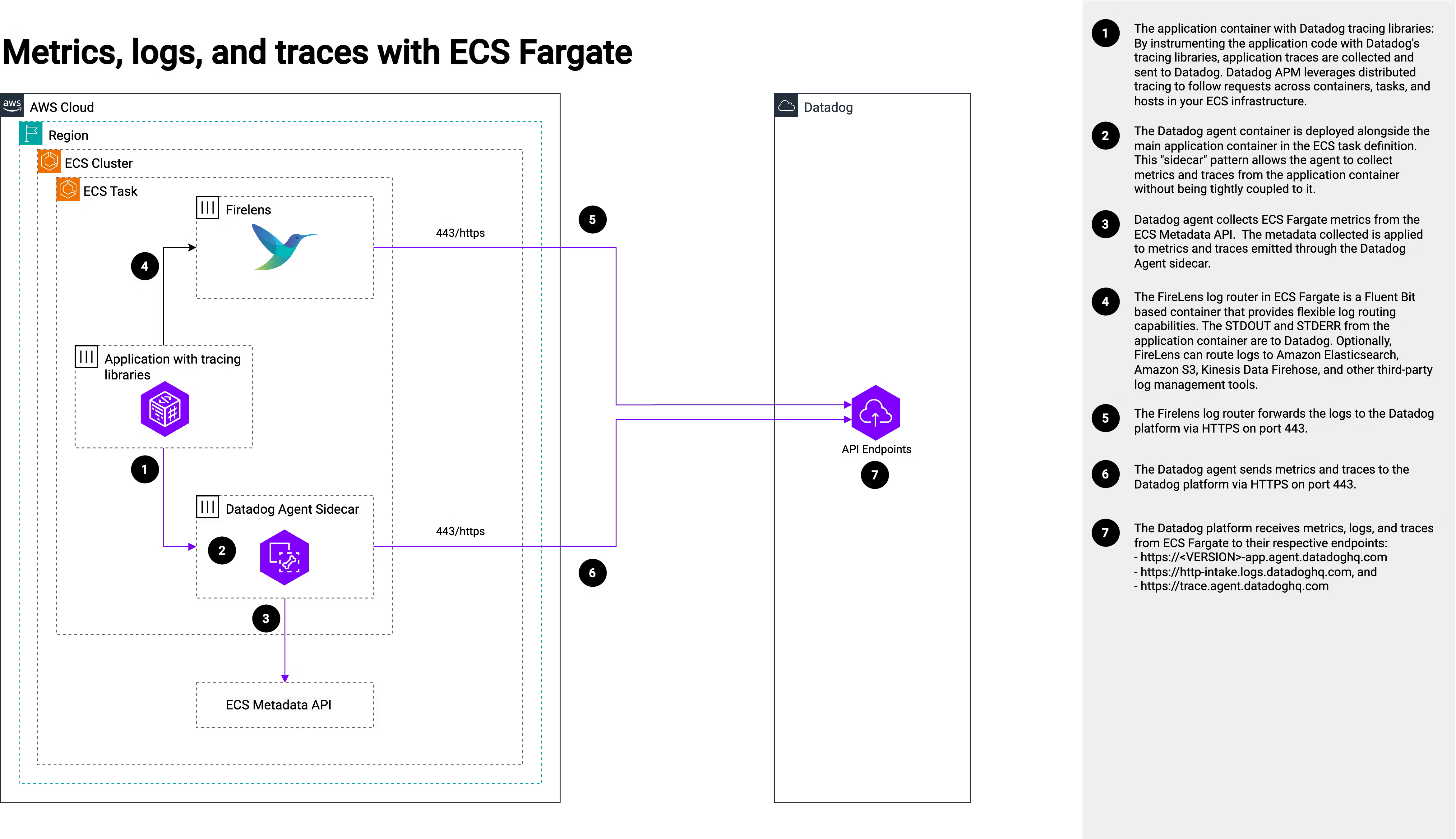
The task definition below shows a representative example with the application container, FireLens log router, and Datadog Agent sidecar.
[
  {
    "essential": true,
    "image": "amazon/aws-for-fluent-bit:stable",
    "name": "log_router",
    "cpu": 0,
    "user": "0",
    "firelensConfiguration":{
        "type": "fluentbit",
        "options" :{
            "enable-ecs-log-metadata":"true",
            "config-file-type": "file",
            "config-file-value": "/fluent-bit/configs/parse-json.conf"
        }
    },
    "logConfiguration": {
      "logDriver": "awslogs",
      "options": {
        "awslogs-group": "${log_group}",
        "awslogs-region": "${region}",
        "awslogs-stream-prefix": "<app_name>-fluent-bit"
      }
    },
    "readOnlyRootFilesystem": true
  },
  {
    "essential": true,
    "image": "app-image",
    "name": "...",
    "memory": "...",
    "cpu": "...",
    "readOnlyRootFilesystem": "...",
    "mountPoints": [
      {
        "sourceVolume": "...",
        "containerPath": "...",
        "readOnly": "..."
      }
    ],
    "logConfiguration": {
      "logDriver": "awsfirelens",
      "options": {
          "Name": "datadog",
          "Host": "http-intake.logs.datadoghq.com",
          "TLS": "on",
          "dd_service": "${service}-${env}-<app_name>-ui",
          "dd_source": "nodejs",
          "dd_tags": "Env:${env}, business_service:${service}, component:${service}-${env}-<app_name>-ui, service_line:${service_line}, department:${department}",
          "provider": "ecs",
          "retry_limit": "2"
      }
    },
    "portMappings": [
      {
        "protocol": "...",
        "appProtocol": "...",
        "name": "...",
        "containerPort": "...",
        "hostPort": "..."
      }
    ],
    "environment": [
      {
        "name": "DD_ENV",
        "value": "${env}"
      },
      {
        "name": "DD_SERVICE",
        "value": "${service}-${env}-<app_name>-ui"
      },
      {
        "name": "DD_PROFILING_ENABLED",
        "value": "true"
      },
      {
        "name": "DD_VERSION",
        "value": "${tag}"
      }
    ],
    "dockerLabels": {
      "com.datadoghq.ad.instances": "[{\"host\": \"%%host%%\", \"port\": ${port}}]",
      "com.datadoghq.ad.check_names": "[\"${service}-${env}-<app_name>-ui\"]",
      "com.datadoghq.ad.init_configs": "[{}]",
      "com.datadoghq.tags.env": "${env}",
      "com.datadoghq.tags.service": "${service}-${env}-<app_name>-ui",
      "com.datadoghq.tags.version": "${tag}"
    }
  },
  {
    "image": "public.ecr.aws/datadog/agent:latest",
    "name": "datadog-agent",
    "essential": true,
    "cpu": 0,
    "readonlyRootFilesystem": true,
    "logConfiguration": {
      "logDriver": "awslogs",
      "options": {
        "awslogs-group": "${log_group}",
        "awslogs-region": "${region}",
        "awslogs-stream-prefix": "<app_name>-datadog-agent"
      }
    },
    "mountPoints": [
      {
        "sourceVolume": "agent_conf",
        "containerPath": "/etc/datadog-agent",
        "readOnly": null
      },
      {
        "sourceVolume": "datadog",
        "containerPath": "/opt/datadog-agent/run",
        "readOnly": false
      },
      {
        "sourceVolume": "datadog",
        "containerPath": "/var/log",
        "readOnly": false
      },
      {
        "sourceVolume": "datadog",
        "containerPath": "/var/lib",
        "readOnly": false
      },
      {
        "sourceVolume": "datadog",
        "containerPath": "/app",
        "readOnly": false
      },
      {
        "sourceVolume": "datadog",
        "containerPath": "/tmp",
        "readOnly": false
      },
      {
        "sourceVolume": "datadog",
        "containerPath": "/root",
        "readOnly": false
      }
    ],
    "environment": [
      {
        "name": "ECS_FARGATE",
        "value": "true"
      },
      {
        "name": "DD_APM_ENABLED",
        "value": "true"
      },
      {
        "name": "DD_APM_NON_LOCAL_TRAFFIC",
        "value": "true"
      },
      {
        "name": "DD_DOGSTATSD_NON_LOCAL_TRAFFIC",
        "value": "true"
      }
    ],
    "portMappings": [
        {
          "hostPort": 8126,
          "protocol": "tcp",
          "containerPort": 8126
        },
        {
          "hostPort": 8125,
          "protocol": "udp",
          "containerPort": 8125
        }
    ],
    "secrets": [
      {
        "name": "DD_API_KEY",
        "valueFrom": "${datadog_api_key}"
      }
    ]
  }
]
Lambda Functions
Lambda functions use the Datadog Lambda Library as a layer to ship logs, metrics, and traces to Datadog.
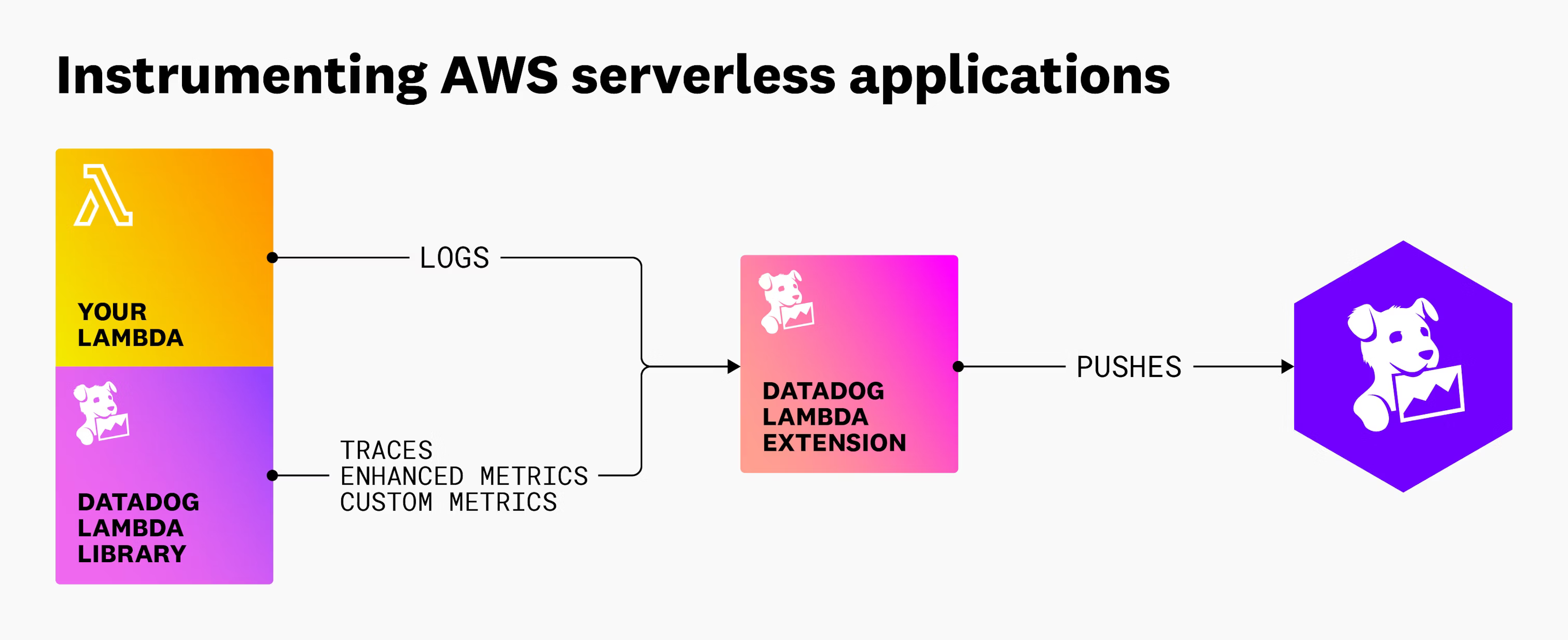
Layer ARNs are published in the Datadog AWS account. Available versions are listed at https://github.com/DataDog/datadog-lambda-js/releases.
For NHS BSA, the layer ARN is typically:
See the Node.js instrumentation guide for implementation details.
module "lambda_<name>_handler" {
  source  = "terraform-aws-modules/lambda/aws"
  version = "= 7.20.1" # https://registry.terraform.io/modules/terraform-aws-modules/lambda/aws/latest

  function_name = format(local.name_prefix, "lam", "<name>", "01")

  # Datadog handler — after initialisation it delegates to the handler defined in DD_LAMBDA_HANDLER
  handler = "/opt/nodejs/node_modules/datadog-lambda-js/handler.handler"
  layers  = [
    "arn:aws:lambda:eu-west-2:464622532012:layer:Datadog-Node22-x:<version>",
  ]

  environment_variables = {
    DD_PROFILING_ENABLED  = true
    DD_LOGS_ENABLED       = true
    DD_TRACE_ENABLED      = true
    DD_LAMBDA_HANDLER     = "index.handler" # Application handler
    DD_API_KEY_SECRET_ARN = aws_secretsmanager_secret.datadog.arn
    DD_SITE               = "datadoghq.com"
    DD_ENV                = var.env_name[terraform.workspace]
    DD_SERVICE            = "${var.service}-${var.env_name[terraform.workspace]}-lambda-<name>-api"
    DD_FLUSH_TO_LOG       = true
  }
}
DD_* Variables Reference
The table below documents all DD_* variables referenced in this guide.
| Variable | Scope | Required | Purpose | Example |
|---|---|---|---|---|
DD_APP_KEY |
CI/CD (Terraform) | Yes | Datadog application key used by the Datadog Terraform provider. | Set as masked CI variable |
DD_API_KEY |
ECS Datadog Agent | Yes | API key used by the Datadog Agent sidecar to authenticate to Datadog. | Loaded from ECS secret datadog_api_key |
DD_API_KEY_SECRET_ARN |
Lambda runtime | Yes | Secret ARN that the Datadog Lambda library reads to obtain API key. | arn:aws:secretsmanager:...:secret:datadog... |
DD_SITE |
Lambda runtime | Yes | Datadog site endpoint used by serverless instrumentation. | datadoghq.com |
DD_ENV |
ECS app + Lambda runtime | Yes | Reserved Datadog tag for deployment environment. | stg |
DD_SERVICE |
ECS app + Lambda runtime | Yes | Reserved Datadog tag identifying the service name. | mccloud-stg-lambda-example-api |
DD_VERSION |
ECS app | Yes | Reserved Datadog tag for application version/release. | ${tag} |
DD_PROFILING_ENABLED |
ECS app + Lambda runtime | Optional | Enables Datadog continuous profiler. | true |
DD_LOGS_ENABLED |
Lambda runtime | Optional | Enables Datadog log forwarding/enrichment for Lambda. | true |
DD_TRACE_ENABLED |
Lambda runtime | Optional | Enables Datadog distributed tracing for Lambda. | true |
DD_LAMBDA_HANDLER |
Lambda runtime | Yes | Points Datadog wrapper handler to the real application handler. | index.handler |
DD_FLUSH_TO_LOG |
Lambda runtime | Optional | Flushes telemetry payloads to CloudWatch logs for forwarding. | true |
DD_APM_ENABLED |
ECS Datadog Agent | Optional | Enables APM collection in the Datadog Agent. | true |
DD_APM_NON_LOCAL_TRAFFIC |
ECS Datadog Agent | Optional | Allows APM intake from other containers/tasks, not only localhost. | true |
DD_DOGSTATSD_NON_LOCAL_TRAFFIC |
ECS Datadog Agent | Optional | Allows DogStatsD metrics from other containers/tasks, not localhost. | true |
Tags
Consistent tagging is essential for filtering and grouping telemetry in Datadog. Datadog reserved tags (env, service, version) should be set using their corresponding environment variables (DD_ENV, DD_SERVICE, DD_VERSION).
| Source | How tags are set |
|---|---|
DD_ENV |
Set in the Lambda handler / ECS task definition |
DD_SERVICE |
Set in the Lambda handler / ECS task definition |
DD_VERSION |
Set at deployment time when uploading the Lambda package |
| Other tags | Sourced automatically from AWS resource tags via the AWS integration |
The table below lists Datadog tag names, examples, and their expected format:
| Datadog Tag | Example | Format |
|---|---|---|
env |
stg |
short form |
department |
nhs-workforce-services |
long form |
service_line |
pensions-services |
long form |
business_service |
mccloud |
long form |
component |
web-app |
short form |
Monitors and Alerting
Monitors are managed by the Live Support Team. Monitor Terraform definitions are maintained in a dedicated Datadog repository separate from the service infrastructure repository. Contact the Live Support Team if you need guidance on defining monitors for your service. Ryan Menzies (Ryan.Menzies@nhsbsa.nhs.uk) is probably the best person to contact for guidance on this matter.
Example of monitor definition
Define monitors in Terraform in each project's dedicated Datadog repository. Implement them for Lambda and ECS Fargate applications in stage and prod environments.
Implement Synthetic tests to validate key user journeys and detect broken pages or structural issues in the application UI.
resource "datadog_monitor" "monitors" {
  name  = "..."
  type  = "..."
  query = "..."

  monitor_thresholds {
    critical = "..."
  }

  message = <<-EOT
    {{#is_alert}}
    ## "${var.service} - <monitor_name> - <environment> is above {{threshold}} on {{business_service.name}}."

    Please investigate:
    ${local.email_to}

    ${each.value.message_additional_info}

    Users Notified:
    ${local.email_cc}
    {{/is_alert}}

    {{#is_recovery}}
    ## "${var.service} - <monitor_name> - <environment> has recovered on {{business_service.name}}."

    Users Notified:
    ${local.email_to}
    ${local.email_cc}
    {{/is_recovery}}
    EOT

}
Set the monitor name and environment placeholders in the message template.
Reference examples: https://gitlab.com/nhsbsa/platform-services/terraform/datadog
For Synthetic tests, Datadog source IP addresses must be allowlisted. Check that this list stays up to date: